
- Analyse external interfaces for risk, technology, business value and other factors.
- Use the context to gain overview of the System within its business or technical environment.
- Identify risks or problems in the immediate vicinity of the System.
Terminology
We distinguish the following terms in context analysis:
- Business Context
- Adjacent organizations, applications, users or interfaces either requiring or providing services or data from or to the System. The business context can be used to describe the overall business process(es) the System is involved in.
- Technical Context
- Adjacent hardware or technical infrastructure, either required by the System or providing data or events to it. When the System can be used or operated in different hardware infrastructures, there might exist several different technical contexts.
Description
Context analysis shall help identify issues associated with external interfaces, e.g. interfaces that:
- influence critical quality requirements of the system (e.g. reliability, security, throughput, runtime performance, operation cost)
- are overly complex
- are brittle or fragile
- are implemented with unsuitable technology
- are underdocumented or poorly understood
- transport critical data (important, sensitive, insecure)
- transport especially huge amounts of data
- have high operational effort
- have high usage cost (e.g. cost-per-request or similar)
- have high cost-of-change or high maintenance costs
- are difficult or impossible to modify/enhance/change
- suffer from operational failures or production issues
Note that user interfaces often belong to the context, especially with respect to the kind of data or events exchanged with users or user groups. Due to the importance of this topic, aim42 devotes an own section to it.
Example
In the context diagram example of fig. Example of Context View you see some user roles and some external systems. The context diagram is accompanied by a tabular description of the elements and/or relationships. Example taken from the HtmlSanityCheck (HtmlSC) open source project.
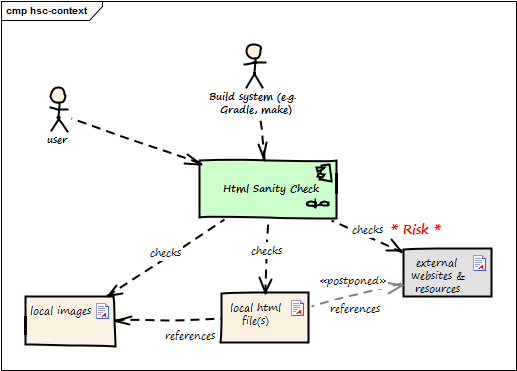
Business Context
| Neighbor | Description |
|---|---|
| user | documents software with toolchain that generates HTML. Wants to ensure that links within this HTML are valid. |
| build system | |
| local HTML files | HtmlSC reads and parses local HTML files and performs sanity checks within those. |
| local image files | HtmlSC checks if linked images exist as (local) files. |
| external web resources | HtmlSC can be configured to optionally check for the existence of external web resources. Due to the nature of web systems, this check might need a significant amount of time and might yield invalid results due to network and latency issues. |
In this example, the complete check has to be completed within 5 seconds (a quality requirement). As access to external websites or resources might be hindered by network latency or even failures, the external interface responsible for this requirement will likely contain risks.